Even though I've been blogging for close to seven years now, it wasn't until I made the switch from Blogger to WordPress that I really started paying attention to SEO. And I instantly kicked myself for not doing it sooner. So today I'm going to be sharing some of my top SEO tips for bloggers.
Blog posts with great SEO rank high on Google and/or Pinterest and can provide you with hundreds if not thousands of page views every single month. And once you've optimised the blog posts, you really don't need to do much for them to generate traffic for you.
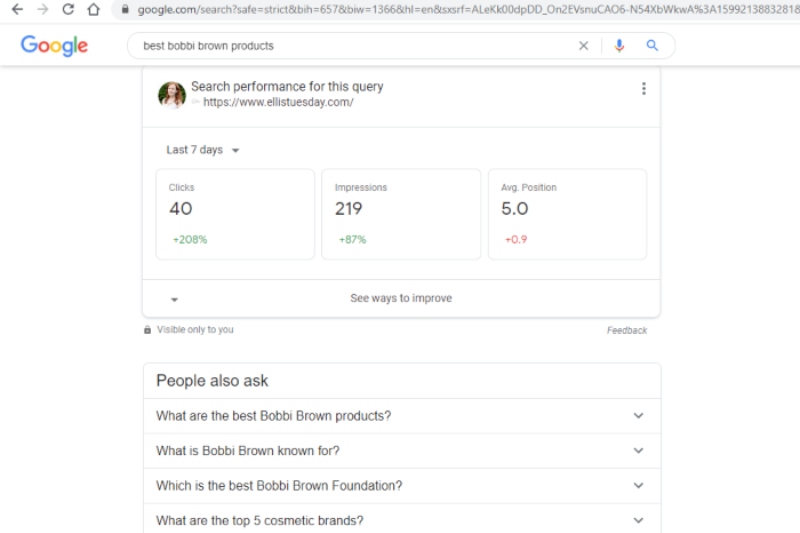
For example, one blog post that I get thousands of views of every month is this one. When you type "best bobbi brown products" into Google I am one of the first websites that is shown both in 'All' and 'Images'. I even rank higher than the Bobbi Brown website for the same search query.
So these are just seven of my top SEO tips for bloggers;
Install the Yoast plugin
This would have to be my number one tip, when it comes to SEO tips for bloggers, as it makes SEO, particularly as a beginner, so easy to follow. It helps from the very beginning of planning a new blog post, to writing it and publishing it. Plus, it makes going back to work on the SEO of previously published blog posts a breeze.
Install the MonsterInsights plugin
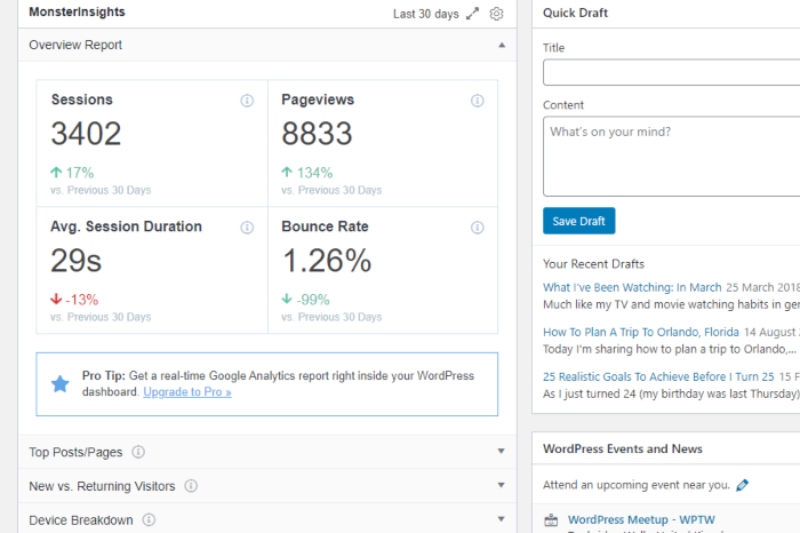
I only started using this plugin a few months ago but it makes tracking your progress so quick and easy to do. As soon as I log into my WordPress Dashboard my MonsterInsights plugin lets me know my sessions, page views, average session duration and bounce rate. With it comparing it to the previous 30 days. I find this super useful to instantly see if what I'm doing, SEO-wise, is making a difference.
It is always worth remembering that seeing results when it comes to your SEO isn't an overnight thing. But every little thing that you do does add up.
Work on lowering your bounce rate by updating old blog posts
Up until this year I really paid no attention to or even knew what a bounce rate was. But after working on getting all my blog posts to green on Yoast, I have seen it decrease massively from 75% to less than 1%.
If you don't already know, your bounce rate is how many people are clicking onto your site and then immediately leaving. So they're not reading a whole blog post or clicking onto another or spending more than a second or two on your blog. The lower your bounce rate is the better. So I can't quite believe the fact that mine was 75% just a few months ago. And now it is under 1%.
When it comes to updating old blog posts, you can do something as simple as making sure the formatting is okay. A lot of mine had shifted because of how they were written on particular Blogger themes way back when. Or you can update the content to make it relevant for this year. Or you can even take and add new photos. As, I've got a feeling your writing and/or photo taking will have improved since you wrote those blog posts years ago.
Work on getting all of your blog posts to green for SEO
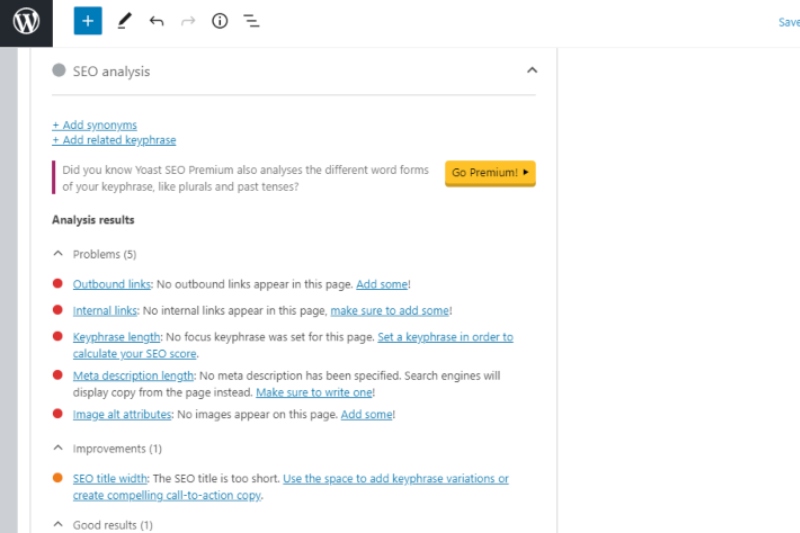
Once you've installed the Yoast plugin you will be able to see if your blog posts are in the red, amber or green. Yoast operates a traffic light system for both SEO and readability. If there are any major problems it will most likely show as red. But it tells you exactly what you need to do to improve it. It might be that you haven't set a keyphrase or a meta description. Or that you haven't added any outbound or internal links (more on that below).
As I had hundreds of blog posts that were either in the red or amber, it did take some time to go into each one. But as I started to improve each of them, my bounce rate in particular, decreased by that incredible amount.
Optimise your images (add alt text, give them descriptive titles & resize them)
As soon as you transfer an image onto your computer give it a name that describes the image. So if you've taken a photo of a Bobbi Brown lipstick, call it something like 'Bobbi Brown lipstick review'. As this is a term that someone will be Googling. And when you upload the image, make sure to add alt text.

This is a description of what the image shows, which helps people with visibility issues to understand what you've posted. You'll also want to make sure not to upload massive image files (like I did for far too many years). Make sure to resize your photos when you're editing them. And then reduce them further in size by using the Smush WordPress plugin. This will help your site load quicker and in turn, show Google that your blog is more 'trusted' than others. Hopefully that makes sense.
Make sure to internal link
This is really important if you want readers to stay on your blog longer. Link to other relevant blog posts that you've written in every blog post that you write. So say, for example, you are writing about a new moisturiser/book/recipe/etc. Find a way to mention previous ones that you've reviewed. For a blog post like this one today, I'd want to link to this one on the benefits of switching to WordPress from Blogger, for example.
Remember that Pinterest is a search engine not a social media platform
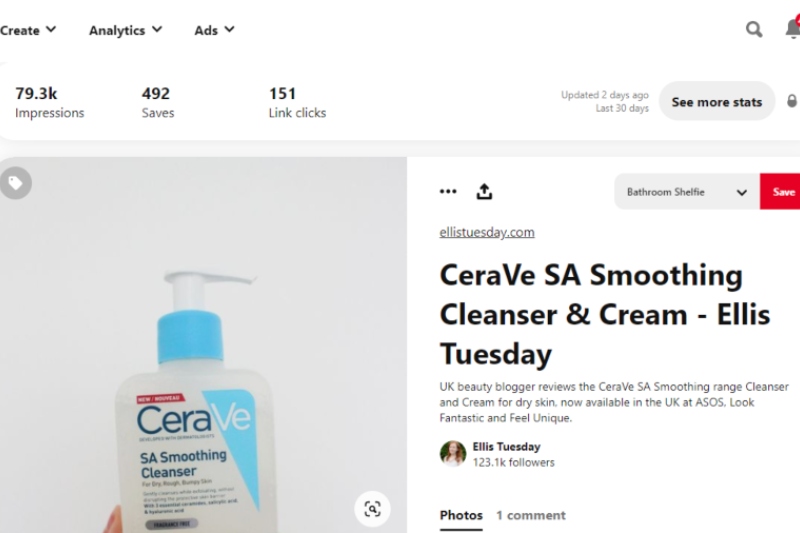
If you only use Pinterest to pin inspiration, you are seriously missing out on literally thousands of views as a blogger. Pinterest is my main source of traffic each month and this is due to a combination of pinning my own blog images and repinning others.
Let me know if you'd like a full blog post dedicated to how to use Pinterest as a blogger, as I have quite a lot to say. For example, I get anywhere between 500,000 and 900,000 monthly viewers on my Pinterest. And I utilise group boards as well as my own.
But for now, those are 7 of my top SEO tips for bloggers.
Do you try to pay attention to SEO as a blogger? If so, do you already follow any of these tips? And would you like to see more blog posts like these, where I share what I've learnt over the years?